


LIVE NBA NFL MLB Streams
4.4905.00 Reviews
App Specs
- Version
- 1.23
- Updated On
- License
- Free
- Downloads
- 100,000+
- Developer
- Ployx Tech
- Categories
- Sports
- Platform
- Android
Screenshots
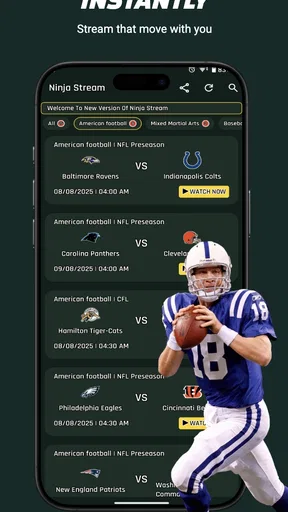
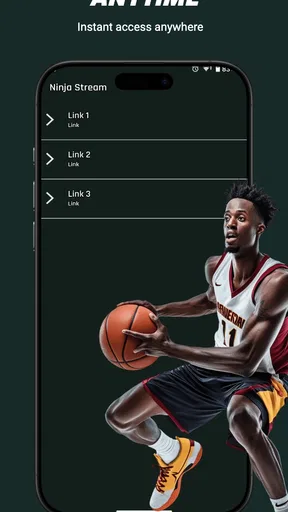
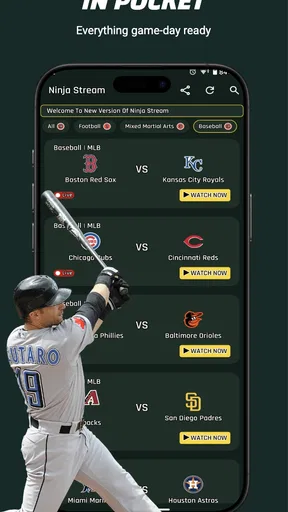
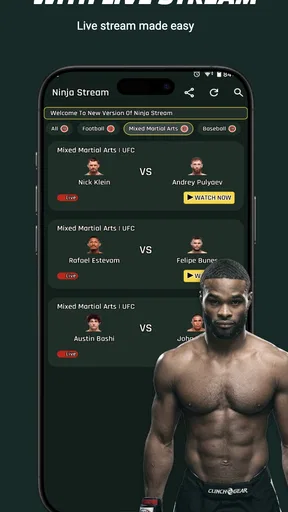
 Analysis by AppCompare
I’d judge a live-sports app by a few practical questions: can I find the event I care about without hunting, does the stream stay watchable on the screen and connection I have, and is the experience worth choosing over a league’s own service or a general sports app? LIVE NBA NFL MLB Streams is aimed at fans who want several major competitions gathered in one place, rather than people looking for a broad sports-news reader. That focus is appealing, but I’d still treat stream reliability and the range of events available to me as things to check during ordinary use, not promises to take on faith.
Who benefits from a multi-sport starting point
The clearest fit is someone who follows more than one of basketball, American football, and baseball and wants a single place to begin looking for live coverage. A fan who only wants occasional scores may be better served by a lightweight score app, while someone who watches one league closely may prefer its official viewing option if it suits their needs. The useful distinction is intent: this is presented as a viewing-first sports app, so it makes most sense when watching live action is the main reason for opening it.
I would also think about where and how I watch. A phone is convenient for checking a game away from home, but a small screen is not ideal for every long event. If I’m commuting, following a late inning or checking a close finish, mobile access can be exactly what I need. If I’m settling in for a full game with friends, I would compare the app’s viewing options with whatever larger-screen setup I already use before making it my default.
How I would test it before relying on it
For a first session, I’d open the app before the event begins, find the game I expect to watch, and check that the stream starts on my usual connection. That small test helps separate a genuine fit from an app that only looks convenient in a description. I’d repeat the check on the network I actually use when travelling, because a smooth home connection does not tell me how well a stream will behave on mobile data.
I’d also try switching away from a stream and returning to it, especially if I often follow more than one game. The practical question is not simply whether multiple events appear, but whether I can move between them without losing track of what I was watching. During a busy sports evening, that workflow matters more than a crowded collection of extra panels. If the app makes the game I want easy to locate, it has already solved a real problem; if I have to search repeatedly, a familiar league app may be less frustrating.
There is a sensible data trade-off with any live video. Watching for a long stretch can use more mobile data than checking scores or reading updates, so I’d reserve extended viewing for Wi-Fi when possible and keep a score-based backup in mind when it isn’t. This is not a reason to avoid the app; it is a reason to decide in advance whether I’m watching a whole event or just checking in for a key moment.
Getting Started with the App
First things first, downloading LIVE NBA NFL MLB Streams was a breeze. Available for both Android and iOS, it’s a quick install from the respective app stores. Once you fire it up, you’re greeted with a clean, intuitive interface that doesn’t bombard you with ads or unnecessary clutter. It’s all about the games here, which is exactly what we want!
Worth Reading Before You Choose

Flipboard Shows What News Apps Must Do Beyond the Feed

Switching to Android Auto Means Rethinking Your Driving Routine

Google Calendar Makes a Crowded Week Easier to Manage

Ludo King Makes the Most of the Minutes Between Plans

Baby Panda World Brings Quick Play to Modern Phones, but Its Game Library Feels Busy

ESPN’s Live Game View Makes Following Close Games Easier
Setting up is simple. You can quickly create an account using your email or social media logins. I appreciate how the app doesn’t ask for excessive personal information – a definite plus for the privacy-conscious among us.
Exploring the Features
The app offers a wide array of features aimed at enhancing the sports viewing experience. You can stream live games from the NBA, NFL, and MLB, all in high definition. The stream quality is impressive, with minimal buffering, which, let’s be honest, is crucial when you’re watching a nail-biting game.
What’s cool is that you can personalize your experience. By selecting your favorite teams, the app curates a customized feed, ensuring you never miss a moment. I loved receiving notifications about game start times and highlights – it’s like having a personal sports assistant.
For those who enjoy a more interactive experience, the app includes live chat features. You can jump into discussions with fellow fans from around the world, sharing the highs and lows of the game in real-time. It’s a fantastic way to feel connected, especially when you’re watching solo.
Additional Perks
Beyond live streaming, LIVE NBA NFL MLB Streams offers video highlights and recaps if you’re short on time but still want to catch up on the action. The app also includes detailed stats, player profiles, and news updates, making it a one-stop shop for sports enthusiasts.
One feature that stands out is the scheduling calendar. It’s incredibly handy for planning your viewing schedule around your favorite teams’ games. You’ll never miss a game with this organized layout, and it syncs smoothly with your device’s calendar.
Making those extras work for you
I’d use the calendar as a planning aid rather than assuming it will manage every part of my sports routine. Adding a game to a device calendar is most useful when I already know which teams matter to me: it turns a general schedule into a reminder I can act on. For a fan who follows several teams across different leagues, that can reduce the small but common hassle of checking schedules repeatedly. For someone who watches only when friends bring up a game, the calendar may be more organization than they need.
Notifications are another feature I’d tune to my habits. Team and event alerts can help when kickoff or tip-off happens while I’m busy, but too many alerts can become noise. I’d start with only the teams I genuinely follow, then adjust if the reminders are either too frequent or not useful enough. That is a more reliable approach than enabling everything at setup and eventually ignoring all notifications.
Highlights and recaps serve a different need from live viewing. They are useful when I missed a game, want to catch a decisive sequence, or need a quick refresher before joining a conversation. They are not a full substitute for watching an event unfold, and a fan who cares about every possession or inning should not treat a short recap as equivalent. The app’s mix of live access and catch-up material is strongest when I use each for the situation it suits.
The Viewing Experience
Let’s talk about the actual viewing experience. The streams are crisp and clear, even on a mobile network. I’m someone who’s often on the go, so being able to watch a game without hiccups is a lifesaver. The app’s interface during games is user-friendly, with easy access to scores, stats, and social sharing options.
One thing I found particularly helpful was the option to switch between different games seamlessly. If you’re like me and follow multiple sports or teams, this feature is a game-changer. You can hop from one match to another without any hassle, ensuring you catch all the action.
Where a different kind of sports app may be better
The main alternative is not one specific rival; it is a different way of following sports. League-focused services and broadcaster apps are natural choices for viewers who want a single competition to be the centre of their setup. A scores-and-news app is a better match for someone who mostly needs results, standings, and quick updates rather than video. A general streaming service may fit a household that wants sports alongside other entertainment, provided it carries the events that household wants to watch.
Against those categories, the appeal here is convenience across several named sports, while the trade-off is that a multi-sport destination may not be every fan’s ideal home base. If I follow one league closely, I would compare the relevant games, viewing experience, and routine with the league-specific option before switching. If I follow several sports casually, having one app to check first may be simpler than opening several separate services. The right choice depends less on the number of features and more on whether the app matches the way I actually watch.
A realistic example: I’m out during a baseball game, then later want to check a basketball matchup. I could use the app to look for the live event, follow the action on my phone, and switch sports when my plans change. If the connection is unreliable, I’d move to a recap or stats rather than keep restarting a stream. That fallback is useful because it turns a frustrating viewing attempt into a reasonable way to stay informed, without pretending that highlights replace the live game.
Compatibility, cost, and the decision to switch
The app is free, and its age rating is Everyone, which makes the initial decision to try it relatively straightforward for a household. Ployx Tech is the developer, and the app is listed in the sports category. It launched on July 6, 2022, and version 1.10 is the current version. On Android, it requires version 6.0 or later. Those details make compatibility worth checking before installing, particularly if I’m setting it up on an older device.
Its average rating is 4.4 from 787 ratings, with 244 written reviews, and it has passed 100K installs. I see that as a sign that other people have tried it, not as proof that every stream or device experience will match mine. Ratings can help me decide whether an app is worth a test, but my own first match is the more useful measure: can I find the event, watch comfortably, and return to the app without needless effort?
Switching does not have to mean abandoning another sports app. I’d first use this one as a second starting point for the leagues it covers, then keep whichever tool is better for scores, schedules, or viewing in my routine. That low-commitment comparison is especially sensible if I already rely on a service for a particular league. If the new app makes cross-sport viewing easier, I can give it more room; if not, I have learned that my existing setup fits better without rebuilding it.
Before making it my regular choice, I’d also consider the practical conditions around viewing: whether I have a stable connection, whether I want to watch on a phone, and whether I’m happy to use video rather than follow a score. These questions are more useful than chasing a long feature checklist. Someone with limited data or a preference for a television-first setup may be happier using a different option for full games and keeping this app for quick mobile checks.
Final Thoughts
In a nutshell, LIVE NBA NFL MLB Streams is a fantastic app for any sports fan. It delivers on its promise to provide live, high-quality streams of your favorite games, coupled with a suite of features that enhance the overall experience. Whether you’re a die-hard fan or just catching the occasional game, this app has something for everyone.
If you’re tired of missing out on live games or dealing with unreliable streams, give this app a shot. It’s user-friendly, packed with features, and, most importantly, it brings the adrenaline rush of live sports right to your pocket. So, grab some snacks, settle into your favorite spot, and enjoy the game!
My recommendation
I’d recommend giving it a try if you want a mobile place to look for live NBA, NFL, and MLB coverage and appreciate having sports viewing, schedules, and catch-up material together. It is most compelling for fans who move between those sports and want an app that can fit short viewing windows as well as a planned game night. I would not make it the automatic choice for a single-league devotee, a viewer who mainly wants scores, or someone who needs a dependable large-screen experience above all else. In those cases, a league-focused, score-led, or television-oriented alternative may suit the job better.
My practical advice is to test it with a game you genuinely care about, on the device and connection you normally use, before building your routine around it. If finding the event and following it feels straightforward, the free app can earn a place alongside your usual sports tools. If the stream or workflow does not suit your circumstances, keeping a more specialized alternative is a perfectly sensible call. For me, that is the fairest way to judge a multi-sport streaming app: by whether it makes the next game easier to follow, not by how many features it can list.
Pros
- High-quality streaming options available.
- User-friendly interface for easy navigation.
- Wide coverage of sports events.
- Real-time updates and notifications.
- Supports multiple streaming devices.
Cons
- Limited to certain geographical regions.
- Requires a stable internet connection.
- Advertisements can be intrusive.
- Subscription costs may apply.
- No offline viewing option available.
FAQs for LIVE NBA NFL MLB Streams
What sports can I watch using LIVE NBA NFL MLB Streams?
LIVE NBA NFL MLB Streams provides access to live streaming of major sports leagues, including the NBA, NFL, and MLB. Users can enjoy watching live games, highlights, and recaps. The app is specifically designed for sports enthusiasts who want to keep up with multiple sports without the need for multiple subscriptions.
Is LIVE NBA NFL MLB Streams free to use?
The app offers a range of free and premium options. While basic access to certain streams may be free, premium content and features such as high-definition streams and zero ads typically require a subscription. Users should check in-app purchase options to understand the full range of services available.
How reliable are the streaming services offered by this app?
LIVE NBA NFL MLB Streams is known for providing reliable streaming services, but users should be aware that streaming quality can vary depending on their internet connection. The app recommends a stable Wi-Fi or high-speed mobile data connection for the best experience, ensuring minimal buffering and interruptions during live games.
Can I watch games on multiple devices with one account?
Yes, LIVE NBA NFL MLB Streams typically allows users to access their account across multiple devices. This feature is ideal for those who want to watch games on their smartphone, tablet, or smart TV. However, simultaneous streaming might be limited, so users should check the terms of service for specific restrictions.
Does the app support international sports leagues?
While the primary focus of LIVE NBA NFL MLB Streams is on U.S.-based leagues like the NBA, NFL, and MLB, it may also offer some international sports events depending on availability and licensing agreements. Users interested in international leagues should explore the app’s offerings directly for the most accurate information.


